
The Controller and Accountant-General’s Department (CAGD) of Ghana has officially introduced a new e-Payslip portal that allows government employees to generate, view, download, and print payslips online with ease. The new platform, known as GOG Employee PayServices, is accessible via: gogepayservices.com
This system replaces the old gogpayslip.com website and provides a more secure, efficient, and user-friendly way for public sector workers to access their monthly salary information.
This guide explains exactly how to generate and download your CAGD payslip on the new portal, using steps taken directly from official CAGD tutorial videos.
What Is the New CAGD Payslip Portal?
The GOG Employee PayServices portal is the official payroll system developed by the Controller and Accountant-General’s Department for managing employee salary information.
With this new portal, government workers can:
- Generate monthly CAGD payslips online
- Download payslips in PDF format
- Print payslips for official use
- Access previous salary records
- View accurate and up-to-date payroll details
All CAGD payslip services are now available only on gogepayservices.com.
Requirements Before Generating Your CAGD Payslip
Before attempting to generate or download a payslip, employees must ensure the following:
- Successful registration on the new CAGD portal
- A valid staff number (employee number)
- A secure password created during registration
- Access to the official website gogepayservices.com
Employees who have not registered must complete registration before accessing payslip services.
How To Generate Your CAGD Payslip on the New Portal
Generating a payslip on the new CAGD e-Payslip system is simple and takes only a few minutes.
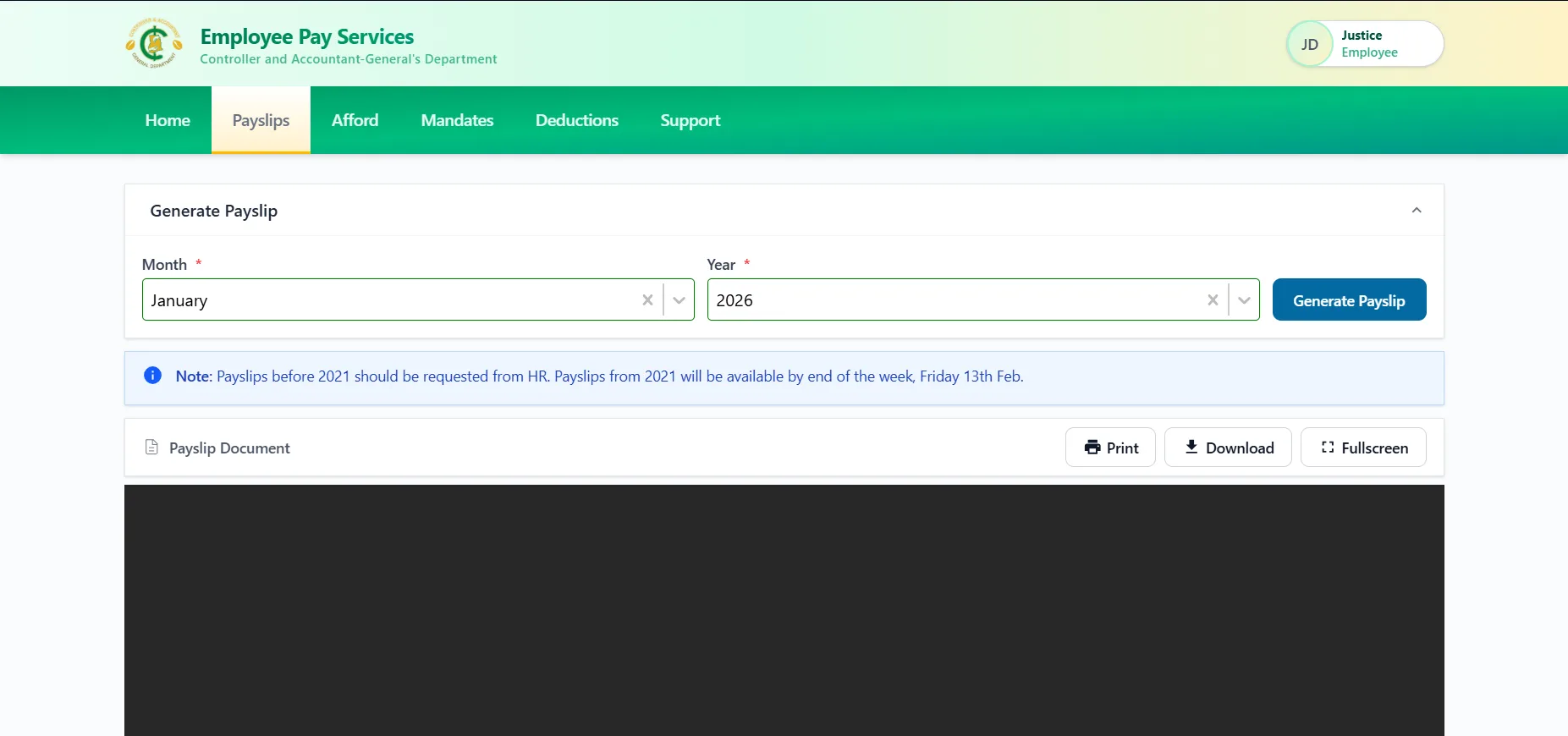
Step-by-Step Guide to Generate CAGD Payslip
- Visit gogepayservices.com
- Log in using your staff number and password
- Once login is successful, you will be redirected to the dashboard
- Locate the menu bar at the top of the page
- Click on “Payslip”
- Select the month and year of the payslip you want
- Click Generate
- Your CAGD payslip will be displayed instantly as a PDF document
The generated payslip contains detailed salary information, including earnings and deductions.
How To Download Your CAGD Payslip (PDF)
After generating the payslip, employees can easily download it for personal or official use.
Steps to Download Payslip
- Ensure the payslip is visible on your screen
- Click the Download option on the PDF viewer
- Save the file to your device (phone or computer)
- The payslip is saved in PDF format for easy sharing or printing
Downloaded payslips can be used for loan applications, visa processing, audits, and official documentation.
How To Print Your CAGD Payslip
Employees who require a hard copy can print their payslip directly from the portal.
Printing Steps
- Generate the payslip as a PDF
- Click Print on the payslip viewer
- Select your printer
- Confirm printing
Alternatively, employees can download the PDF and print it later.
Key Features of the New CAGD Payslip System
The new CAGD e-Payslip portal offers several advantages over the old system:
- Faster payslip generation
- Secure login and authentication
- Accurate salary records
- Easy PDF downloads
- Mobile-friendly interface
- Access to historical payslips
These improvements make salary management more efficient for government workers across Ghana.
Important Notes for Government Employees
- The old payslip site gogpayslip.com is no longer active
- All payslips must now be accessed via gogepayservices.com
- Payslips can only be generated after successful login
- Salary discrepancies should be reported to the HR department
Troubleshooting Payslip Issues
If a payslip does not generate:
- Confirm the correct month and year were selected
- Ensure internet connectivity is stable
- Log out and log back in
- Contact your HR department if the issue persists
Conclusion
The new Controller & Accountant-General’s Department e-Payslip portal provides a secure and efficient way for government employees to generate, download, and print payslips online.
By using gogepayservices.com, employees can access their salary records anytime, anywhere, without delays. Government workers are encouraged to log in regularly, generate their payslips, and download copies for record-keeping and official use.
Published By: Justice Donkoh | GESHub.org