
The Teachers’ Fund has made it easier than ever for members to increase their contributions through its Off-Payroll Contribution feature, available on the Teachers’ Fund Mobile App and Web Portal. This digital service allows members to make voluntary contributions directly from their Mobile Money (MoMo) wallets — quickly, securely, and at no extra cost.
If you are looking for a complete guide on how to make Teachers Fund Off-Payroll Contribution via Mobile Money (MoMo), this detailed step-by-step article explains everything you need to know.
What Is Teachers Fund Off-Payroll Contribution?
The Teachers Fund Off-Payroll Contribution is a voluntary payment option that allows members to contribute funds outside their regular payroll deductions.
Unlike automatic payroll contributions, this feature gives members full flexibility to:
- Contribute any amount of their choice
- Make payments anytime
- Use Mobile Money (MoMo) for convenience
- Receive instant credit in real time
- Pay zero transaction fees
Every contribution made through this system is credited in full to your Teachers’ Fund account.
Where to Access the Teachers Fund Off-Payroll Contribution Feature
Members can access the service through:
- Teachers’ Fund Mobile App
- Teachers’ Fund Web Portal: crm.teachersfund.org.gh
Both platforms are fully functional and designed for secure transactions.
Requirements Before Making a Contribution
Before proceeding, ensure you have:
- An active Teachers’ Fund account
- Login details for the Mobile App or Web Portal
- A registered Mobile Money (MoMo) number
- Sufficient funds in your MoMo wallet
- Your MoMo PIN for authorization
How to Make Teachers Fund Off-Payroll Contribution via Mobile Money (MoMo)
Follow the detailed steps below to successfully complete your contribution:
Step 1: Log Into Your Account
Open the Teachers’ Fund Mobile App on your smartphone or visit the official web portal: crm.teachersfund.org.gh. Enter your login credentials to access your dashboard.
Step 2: Select “Contribution”
Once logged in, navigate to the main menu and click on Contribution. This section contains all available contribution options.
Step 3: Choose “Off-Payroll Contribution”
From the available options, select Off-Payroll Contribution. This will redirect you to the payment setup page.
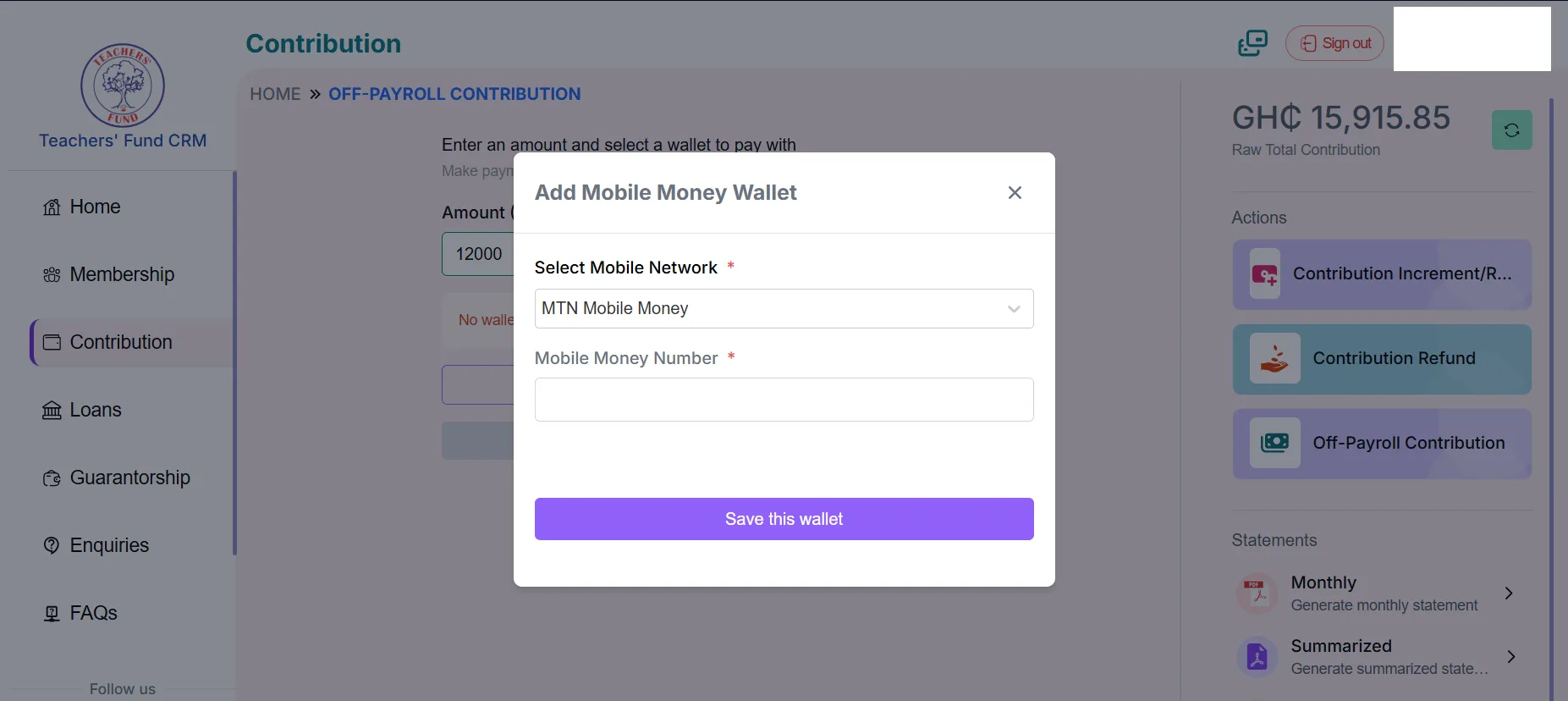
Step 4: Select Your Mobile Network (First-Time Users)
If you are using this feature for the first time:
- Choose your appropriate mobile network (e.g., MTN, Vodafone, AirtelTigo).
- Confirm your selection before proceeding.
Step 5: Add Your Mobile Money Wallet
Enter your Mobile Money number and save it as your preferred wallet. This ensures faster transactions in the future.
Step 6: Select Mobile Money (MoMo) as Payment Option
Choose Mobile Money (MoMo) as your preferred payment method and click Continue.
Step 7: Enter the Amount You Wish to Contribute
Input the amount you want to contribute. The system allows you to contribute:
- Any amount
- At any time
- Without restrictions
There are no service charges or deductions.
Step 8: Confirm and Receive MoMo Prompt
After entering the amount, confirm your payment details. A Mobile Money prompt will be sent instantly to your phone.
Step 9: Authorize the Transaction
On your phone:
- Enter your MoMo PIN
- Approve the transaction
Ensure you verify the payment details before entering your PIN.
Step 10: Receive Instant Confirmation
Once authorization is successful:
- Your contribution is credited immediately
- The transaction reflects in your Teachers’ Fund account in real time
- You may receive SMS and in-app confirmation
Key Benefits of Using Mobile Money for Teachers Fund Off-Payroll Contribution
- Zero Fees: There are no transaction costs. Every pesewa goes directly into your contribution account.
- Instant Credit: Funds reflect in your Teachers’ Fund account immediately after authorization.
- Convenience: No need to visit an office. Everything is done digitally.
- Flexible Contribution Frequency: You can contribute: Daily, Monthly, Quarterly or Yearly.
- Secure Transactions: Mobile Money transactions are protected by PIN authorization, ensuring your funds remain secure.
Why Teachers Should Consider Off-Payroll Contributions
Making voluntary off-payroll contributions helps members:
- Increase long-term savings
- Strengthen retirement benefits
- Improve financial planning
- Take control of contribution growth
This feature is especially useful for teachers who want to boost their savings beyond statutory payroll deductions.
Frequently Asked Questions (FAQs)
Is there any charge for using Mobile Money?
No. The Teachers’ Fund does not charge any fees for Off-Payroll Contributions.
How long does it take for the contribution to reflect?
The contribution is credited in real time after successful MoMo authorization.
Can I contribute multiple times?
Yes. You can contribute as often as you wish.
Is there a minimum or maximum contribution amount?
Members can contribute any amount of their choice.
Final Thoughts
The introduction of the Teachers Fund Off-Payroll Contribution via Mobile Money (MoMo) represents a major improvement in digital financial services for teachers. With its zero-cost structure, real-time crediting, and user-friendly process, members can now conveniently grow their contributions anytime and anywhere.
Teachers are encouraged to log into the Teachers’ Fund Mobile App or Web Portal today and take advantage of this flexible contribution option to enhance their financial future.
Published By: Justice Donkoh | GESHub.org