
• Home
  • News
  • Guides
  • GES Files
  • NSMQ
  • About
  • Copyright
  • Contact Us
  • Privacy Policy
  • About Justice Donkoh
No Result
View All Result
  • Home
  • News
  • Guides
  • GES Files
  • NSMQ
  • About
  • Copyright
  • Contact Us
  • Privacy Policy
  • About Justice Donkoh
No Result
View All Result
GESHub.org
No Result
View All Result

GES introduces QR Code on 2024 graduate recruitment appointment letters for validation – Check Here!

Justice Donkoh by Justice Donkoh
in News
A A
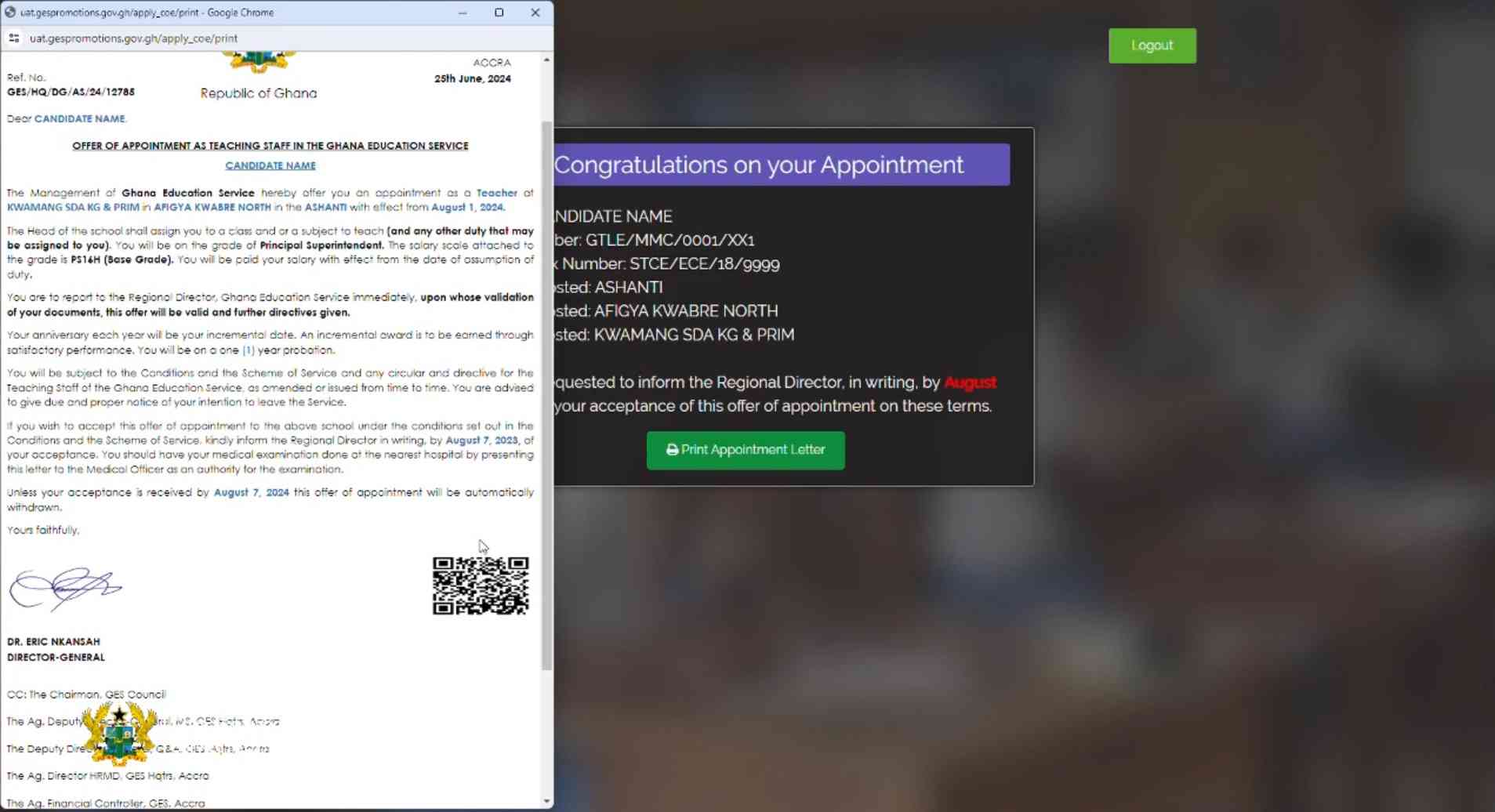
GES Appointment Letter Checking & Printing
Share on FacebookShare on Twitter
Ad-iqualify.jpg

The Ghana Education Service (GES) has announced an innovative step in the recruitment process for the first batch of degree holders (2022) from Public Colleges of Education. Starting this year, all appointment letters issued to successful applicants will feature a QR Code, aimed at enhancing the validation and authenticity of these documents.

What is the QR Code for?

The introduction of the QR Code on appointment letters serves a crucial purpose: to ensure the validity of each document issued to newly recruited teachers. This measure is part of GES’s commitment to combating the issuance and use of fake appointment letters, which has been a concern in past recruitment exercises.

READ ALSO  GES Releases Official Notice On 2026 WASSCE Results Release - Check Here!

How does it work?

  1. Validation Process: Each appointment letter will contain a unique QR Code.
  2. Scanning the QR Code: Applicants can easily verify the authenticity of their appointment letters by scanning the QR Code using a smartphone or any QR Code scanner application.
  3. Instant Verification: Upon scanning, applicants will receive immediate confirmation regarding the authenticity of their appointment letter. This process helps eliminate the risks associated with counterfeit documents and provides peace of mind to the recipients.

Steps for Applicants

If you are one of the successful applicants from the 2022 batch of Public Colleges of Education, here’s what you need to do:

  1. Access the Portal: Visit the official GES promotions website at gespromotions.gov.gh.
  2. Verification: Enter your College Index Number to confirm your qualification status.
  3. Provide Details: Input your accurate phone number and NTC number for validation purposes.
  4. Receive OTP: A One-Time Password (OTP) will be sent to your provided phone number.
  5. Select Preferences: Navigate through the portal to select your preferred Region, District, and School.
  6. Print Appointment Letter: After selecting your preferences, save and print out your appointment letter which includes the QR Code.
  7. Verification at Regional Directorate: Bring your Ghana Card and other necessary documents to your respective Regional Education Directorate for final verification and further instructions.
READ ALSO  What Does CSSPS Placement Pending Mean? - Check Here!

Benefits of the QR Code System

  • Enhanced Security: Mitigates the risk of fraudulent appointment letters.
  • User-Friendly: Easy verification process through a simple scan.
  • Efficiency: Streamlines the validation process for both applicants and GES officials.

The introduction of the QR Code on appointment letters marks a significant milestone in the effort to modernize and secure the recruitment process within the Ghana Education Service. Applicants are encouraged to utilize this new feature to ensure that their appointment is legitimate and secure.

READ ALSO  2026 BECE Placement Results - Check Here!

For more details on the GES recruitment process and updates, visit their official website or contact your Regional Education Directorate. Stay tuned for more updates on educational initiatives and developments in Ghana!

Published By: Justice Donkoh | GESHub.org

Ad-iqualify.jpg
Ad-iqualify.jpg
ShareTweetSendShare

Related Posts

GES Regional Offices Current Locations

All 16 GES Regional Offices & Their Current Locations | 2026

1 month ago
GES Regional Offices, Current Locations & Office Numbers

GES Regional Offices, Current Locations & Office Numbers | 2026

1 month ago
GES Regional Office Contact Number

Official GES Regional Office Contact Numbers – Check Here!

1 month ago
All GES Regional Offices Contact Numbers

2026 GES Recruitment | All Regional Offices Contact Numbers – Check Here!

1 month ago
2026 GES Recruitment - What To Do Before Reporting To Regional Office

2026 GES Recruitment | What To Do Before Reporting To Regional Office – Check Here!

1 month ago
2026 GES Graduate Recruitment Regional Master List Update

2026 GES Graduate Recruitment Regional Master List Update – Check Here!

1 month ago
Master List

2026 GES Graduate Recruitment Master List – Check Here!

1 month ago
2026 GES Recruitment Onboarding Documents

Official Documents Needed For 2026 GES Recruitment Onboarding At Regional Office – Check Here!

1 month ago
2026 GES Graduate Teacher Recruitment Appointment Letters Update

| Just In | GES Releases Appointment Letters For 2026 Graduate Recruitment – Check Here!

1 month ago
Load More
Next Post
GES

GES outlines necessary documents needed for successful 2024 graduate recruitment onboarding - Check Here!

GES Self-Placement & Posting Module

GES opens recruitment portal for graduates to perform self-posting – Apply Here!

CAGD

CAGD releases salary payment schedule for July 2024 - Check Here!

Leave a Reply Cancel reply

Your email address will not be published. Required fields are marked *

  • Home
  • About
  • Copyright
  • Contact Us
  • Privacy Policy
  • About Justice Donkoh

© 2023 - 2026 GESHub.org. Designed by Justice Donkoh. All Rights Reserved. Thank you for visiting us.

Powered by WordPress

No Result
View All Result
  • Home
  • News
  • Guides
  • GES Files
  • NSMQ
  • About
  • Copyright
  • Contact Us
  • Privacy Policy
  • About Justice Donkoh

© 2023 - 2026 GESHub.org. Designed by Justice Donkoh. All Rights Reserved. Thank you for visiting us.