
• Home
  • News
  • Guides
  • GES Files
  • NSMQ
  • About
  • Copyright
  • Contact Us
  • Privacy Policy
  • About Justice Donkoh
No Result
View All Result
  • Home
  • News
  • Guides
  • GES Files
  • NSMQ
  • About
  • Copyright
  • Contact Us
  • Privacy Policy
  • About Justice Donkoh
No Result
View All Result
GESHub.org
No Result
View All Result

GES directs 2024 recruitment applicants to select their preferred region, district and school for posting – Apply Here!

Justice Donkoh by Justice Donkoh
in News
A A
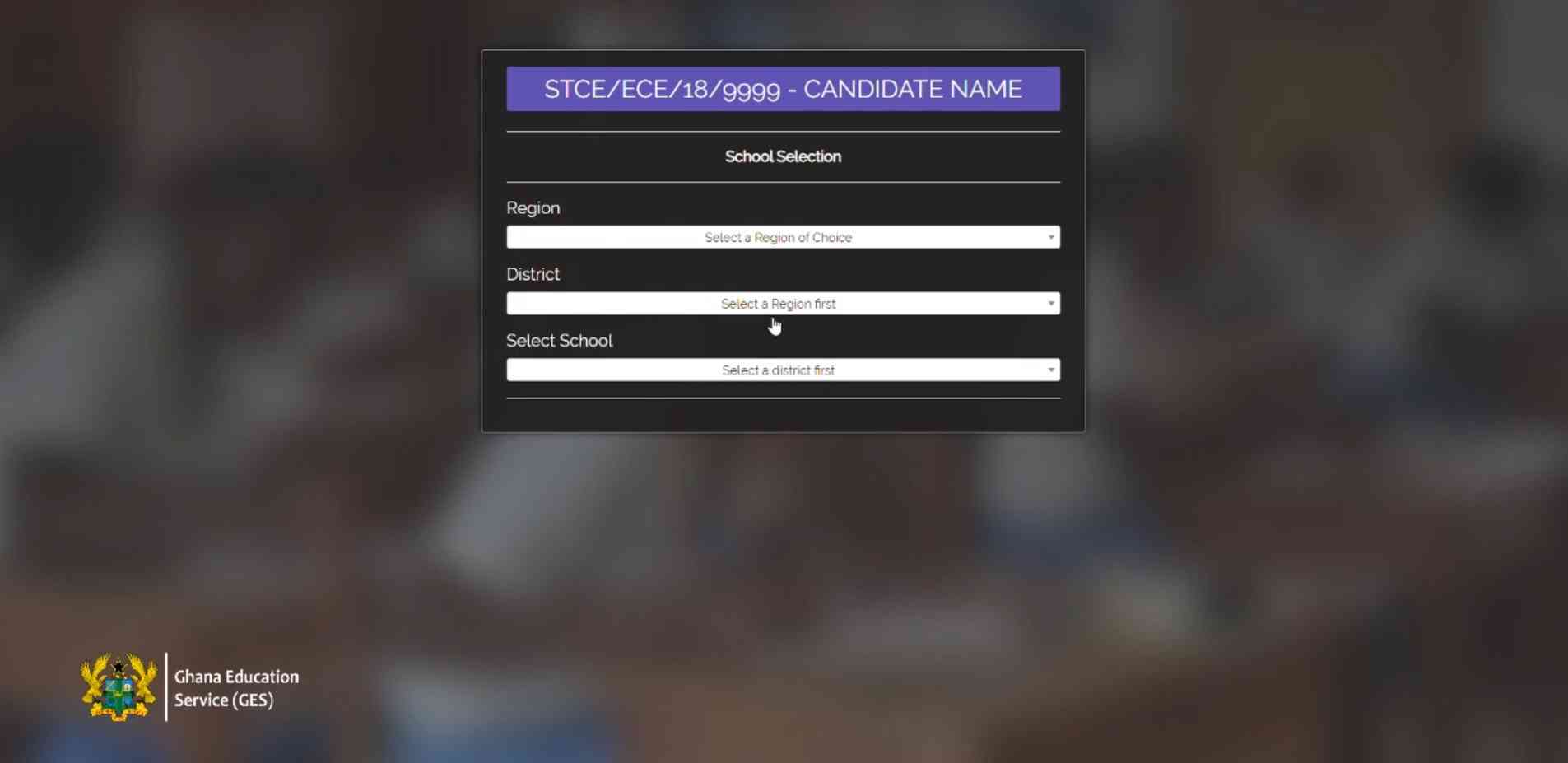
Selecting Preferred GES Recruitment Region, District & School for Posting
Share on FacebookShare on Twitter
Ad-iqualify.jpg

The Ghana Education Service (GES) has introduced an innovative ‘self-posting’ module for the recruitment of the first batch of 2022 degree holders from Public Colleges of Education. This groundbreaking move aims to streamline the recruitment process and enhance the deployment of newly trained teachers across the country.

Self-Posting Module Overview

Starting from 5th July to 31st July 2024, all qualified 2022 graduates from Public Colleges of Education who applied for recruitment via the GES Promotions Portal and met all the necessary requirements are invited to select their preferred Region, District, and School for posting.

READ ALSO  GES Releases Official Notice On 2026 WASSCE Results Release - Check Here!

Why Self-Posting?

The self-posting recruitment module presents several advantages:

  1. Language Proficiency: Ensures that teachers are posted to regions where they can effectively communicate in the local language (L1), fostering a better teaching and learning environment.
  2. Proximity to Family: Allows teachers to select schools close to their families, thereby enjoying economic and emotional support.

How to Access the Platform

Qualified applicants must follow these steps to access their appointment letters:

  1. Visit the Portal: Go to gespromotions.gov.gh.
  2. Verify Qualification: Enter your College Index Number.
  3. Provide Details: Accurately input your phone number and NTC number for validation.
  4. Receive OTP: A One-Time Password (OTP) will be sent to the provided phone number.
  5. Enter OTP: Input the OTP on the portal.
  6. Select Preferences: Carefully choose your preferred Region, District, and School, then submit.
  7. Save and Print: Save and print out your Appointment Letter.
READ ALSO  Full Report | Outcome of meeting between Education Minister & Teacher Unions - Check Here!

Verification of Appointment Letters

All Appointment Letters will feature a QR Code for validation. Applicants can scan the QR code with a smartphone to verify the authenticity of the letter. This measure is introduced to eliminate the risk of fake appointment letters.

Next Steps for Successful Applicants

After receiving the Appointment Letter, successful applicants must proceed to their respective Regional Education Directorates with their Ghana Card and other necessary documents for verification and further directives. Stay tuned for more updates and further instructions on the GES recruitment process.

Ad-iqualify.jpg

Published By: Justice Donkoh | GESHub.org
Ad-iqualify.jpg
ShareTweetSendShare

Related Posts

GES Regional Offices Current Locations

All 16 GES Regional Offices & Their Current Locations | 2026

1 month ago
GES Regional Offices, Current Locations & Office Numbers

GES Regional Offices, Current Locations & Office Numbers | 2026

1 month ago
GES Regional Office Contact Number

Official GES Regional Office Contact Numbers – Check Here!

1 month ago
All GES Regional Offices Contact Numbers

2026 GES Recruitment | All Regional Offices Contact Numbers – Check Here!

1 month ago
2026 GES Recruitment - What To Do Before Reporting To Regional Office

2026 GES Recruitment | What To Do Before Reporting To Regional Office – Check Here!

1 month ago
2026 GES Graduate Recruitment Regional Master List Update

2026 GES Graduate Recruitment Regional Master List Update – Check Here!

1 month ago
Master List

2026 GES Graduate Recruitment Master List – Check Here!

1 month ago
2026 GES Recruitment Onboarding Documents

Official Documents Needed For 2026 GES Recruitment Onboarding At Regional Office – Check Here!

1 month ago
2026 GES Graduate Teacher Recruitment Appointment Letters Update

| Just In | GES Releases Appointment Letters For 2026 Graduate Recruitment – Check Here!

1 month ago
Load More
Next Post
Dr. Eric Nkansah - GES Director

GES explains rationale behind self-placement/posting recruitment module - Check Here!

Selecting Preferred GES Recruitment Region, District & School for Posting

2024 GES Recruitment | Simple steps to follow to select preferred region, district & school for posting

GES Appointment Letter Checking & Printing

GES introduces QR Code on 2024 graduate recruitment appointment letters for validation - Check Here!

Leave a Reply Cancel reply

Your email address will not be published. Required fields are marked *

  • Home
  • About
  • Copyright
  • Contact Us
  • Privacy Policy
  • About Justice Donkoh

© 2023 - 2026 GESHub.org. Designed by Justice Donkoh. All Rights Reserved. Thank you for visiting us.

Powered by WordPress

No Result
View All Result
  • Home
  • News
  • Guides
  • GES Files
  • NSMQ
  • About
  • Copyright
  • Contact Us
  • Privacy Policy
  • About Justice Donkoh

© 2023 - 2026 GESHub.org. Designed by Justice Donkoh. All Rights Reserved. Thank you for visiting us.