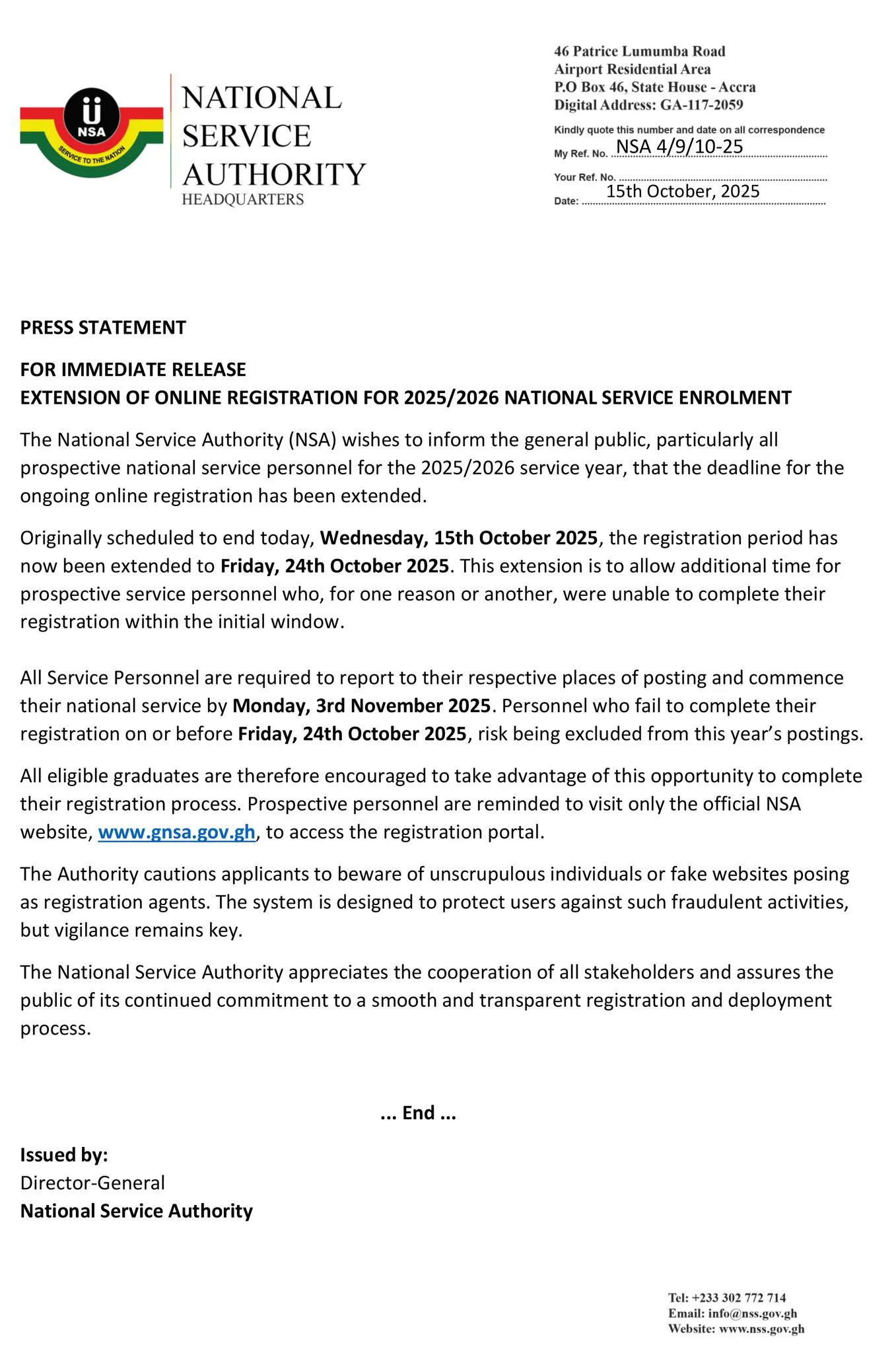
In a new update from the National Service Authority (NSA), the deadline for the ongoing online registration for the 2025/2026 National Service enrolment has officially been extended.
Originally set to close on Wednesday, 15th October 2025, the registration window will now remain open until Friday, 24th October 2025. This extension comes as part of the NSA’s efforts to give prospective national service personnel additional time to complete their registration, especially those who faced challenges accessing or finalizing their applications within the initial deadline.
According to the statement issued by the Authority, the decision reflects the NSA’s commitment to ensuring fairness and inclusivity in the registration and deployment process. The Authority acknowledged that some applicants may have encountered unforeseen issues such as network difficulties, incomplete documentation, or other personal constraints that prevented them from finishing their registration on time.
The NSA further emphasized that all registered service personnel are expected to report to their respective places of posting and officially commence national service on Monday, 3rd November 2025. The Authority has cautioned that any prospective personnel who fail to complete their registration by the new deadline of Friday, 24th October 2025, risk being excluded from this year’s postings.
The National Service Authority expressed appreciation to all stakeholders, including tertiary institutions, partner organizations, and the general public, for their cooperation and support throughout the registration period. It also reaffirmed its dedication to maintaining a smooth, transparent, and efficient national service process for all participants.
For more details and to complete the registration, prospective personnel are encouraged to visit the official National Service Scheme (NSS) online portal before the new deadline.
Key Dates to Remember:
- Registration Deadline (Extended): Friday, 24th October 2025
- Commencement of National Service: Monday, 3rd November 2025
National Service Enrollment Guide 2025/2026
Step 1: Accessing the Official NSA Portal
The first step in the NSS registration 2025/2026 process is to visit the official portal. Prospective service personnel should open their web browser and go to the official URL: posting.gnsa.gov.gh. On the homepage, click on the “PIN Code & Enrollment” button to begin.
Step 2: How to Check Your NSS PIN Code
On the “Check your Pincode” screen, you will be required to enter your:
- Index Number
- Date of Birth (as it appears on your Ghana Card)
After filling in these details accurately, click “Check PIN Code” to proceed. This is the essential first step to generate your unique NSS PIN.
Step 3: Generate and Pay for Your PIN Code
Once your details are verified, your NSS PIN Code will be displayed on the screen. Note that the status will be “inactive” until payment is made. Click the “Make Payment” button to activate your PIN. The NSS PIN code fee for the 2025/2026 year is GHS 41.00.
Step 4: Make Payment via Mobile Money
You will be redirected to a secure checkout page. To complete the NSS PIN payment:
- Select your mobile money network provider (MTN, AirtelTigo, or Telecel).
- Enter your active phone number.
- Click “Make Payment.”
You will receive a prompt on your phone to authorize the transaction. After approving the payment, click “I Have Paid” on the portal. If you don’t get a prompt, you can manually approve the transaction via the USSD menu by dialing *170#.
Step 5: Configure Your NSA Account
After successful payment, the next critical step is NSS account configuration. You will need to provide and confirm your:
- Email Address
- Phone Number
- Password
Click “Complete Setup” to finalize your account creation. This secures your access to the portal for all future logins.
Step 6: Log In to the NSA Portal
With your account now active, return to the portal homepage. Use your registered email address and password to log in to the NSA portal and gain access to your profile.
Step 7: Ghana Card Verification
A key part of the NSA verification process is entering your Ghana Card Number. Ensure you enter it in the correct format: 3 letters, 9 digits, and 1 digit (e.g., GHA-123456789-0). Click “Next” after entering the number.
Step 8: Set Up Your Payment Account
You will be asked if you have an existing GhanaPay account. Select “Yes” or “No” accordingly. This step is crucial for managing your National Service allowance.
Step 9: Allowance Allocation and Bank Selection
In this step, you will select your preferred bank for NSS allowance. Choose from the list of partner banks (like ABSA, ADB, etc.) where you wish to receive your monthly allowance and any refunds. Don’t forget to tick the consent box agreeing to the terms.
Step 10: Review and Submit Your Application
This is your final check. The NSS application review page allows you to carefully go through all the personal and registration information you have provided. Ensure everything is accurate—from your residential address to your GPS code. Once confirmed, click “Submit.”
Step 11: Access Your NSA Personnel Dashboard
Congratulations! Upon submission, you will be redirected to your NSA Personnel Dashboard. This dashboard is your central hub for the entire service period. Here, you can:
- Track your NSS posting status.
- View and update your personal details.
- Access all service-related information.
Your National Service enrollment for 2025/2026 is now complete!
By following this detailed National Service Enrollment Guide, all prospective service personnel can complete their registration efficiently. Bookmark this page and share it with your colleagues to ensure a seamless start to the national service year.
FAQs For National Service Enrollment 2025/2026
1. What is the official website for NSS registration 2025/2026?
The official portal for all National Service registration activities is posting.gnsa.gov.gh. Always ensure you are on this correct website to avoid phishing scams.
2. I can’t find my PIN code. What should I do?
Your PIN code is generated on the portal. To check your NSS PIN:
- Go to the official portal.
- Click “PIN Code & Enrollment.”
- Enter your Index Number and Date of Birth (as it appears on your Ghana Card).
- Click “Check PIN Code.” If your details are correct, your PIN will be displayed.
3. Why is my NSS PIN code status ‘inactive’?
The PIN status remains ‘inactive’ until you successfully complete the payment of the GHS 41.00 fee. Once payment is confirmed and authorized, the status will automatically change to ‘active’.
4. How can I pay for my NSS PIN code?
Payment is made via Mobile Money (MoMo). On the checkout page:
- Select your network (MTN, AirtelTigo, or Telecel).
- Enter your phone number.
- Click “Make Payment” and authorize the transaction on your phone.
- Finally, click “I Have Paid” on the portal.
5. I didn’t receive a prompt to authorize the payment. What do I do?
If you don’t receive an automatic prompt, you can manually approve the transaction:
- Dial *170# on your phone.
- Select ‘Wallet’ (usually option 0).
- Choose ‘My Approvals’ (option 3).
- Enter your MoMo PIN to view pending transactions.
- Select the pending NSS payment and approve it.
6. I forgot my password for the NSA portal. How can I reset it?
There should be a “Forgot Password” link on the login page. Click on it and follow the instructions. A password reset link will typically be sent to the email address you used during the account configuration (Step 5).
7. What is the correct format for the Ghana Card number?
You must enter your Ghana Card number in the format: GHA-123456789-0. This means 3 letters, a hyphen, 9 digits, a hyphen, and 1 digit. Ensure there are no spaces.
8. What is a GhanaPay account, and do I need one?
GhanaPay is a payment platform. The NSA uses it to disburse allowances. If you already have an account (e.g., from a previous registration), select “Yes.” If not, select “No, I don’t have a GhanaPay account,” and the system will guide you through the setup, or it may be created automatically.
9. Can I change my selected bank for allowance after submission?
It is generally difficult to change your selected bank after final submission. It is highly recommended to carefully choose your preferred bank for allowance during the initial enrollment process (Step 9). Double-check your selection before clicking “Submit.”
10. What should I do if I make a mistake during the application review?
Before you click the final “Submit” button, you can usually navigate back using the “Previous” or “Back” button to correct any mistakes. Once submitted, changes are very difficult to make and may require you to contact NSA support or visit a district office.
11. I have submitted my application. What’s next?
After submission, you will be redirected to your Personnel Dashboard. The next step is to wait for the NSS Posting to be released. Regularly check your dashboard and official NSA communication channels for updates on your placement.
12. Who can I contact for technical support or if I encounter an error?
For technical issues like payment failures, portal errors, or login problems, you should contact the National Service Secretariat directly through their official helpline, email, or social media channels. Avoid sharing your login details with third parties.
13. Is the NSS registration fee refundable?
No, the NSS PIN code fee of GHS 41.00 is a non-refundable processing fee.
14. What documents do I need to complete the online registration?
You will primarily need your:
- Academic Index Number
- Ghana Card (for the number and accurate personal details)
- Active Mobile Money wallet with sufficient funds (GHS 41.00 + possible network charges)
- A valid and frequently accessed email address.
Stay tuned for more updates from the National Service Authority and ensure all registration procedures are completed before the deadline to secure your placement for the 2025/2026 service year.
Published By: Justice Donkoh | GESHub.org